WebMasterToolkits

  • Why Affiliate Programs Are the Easiest Online Income Source in 2026

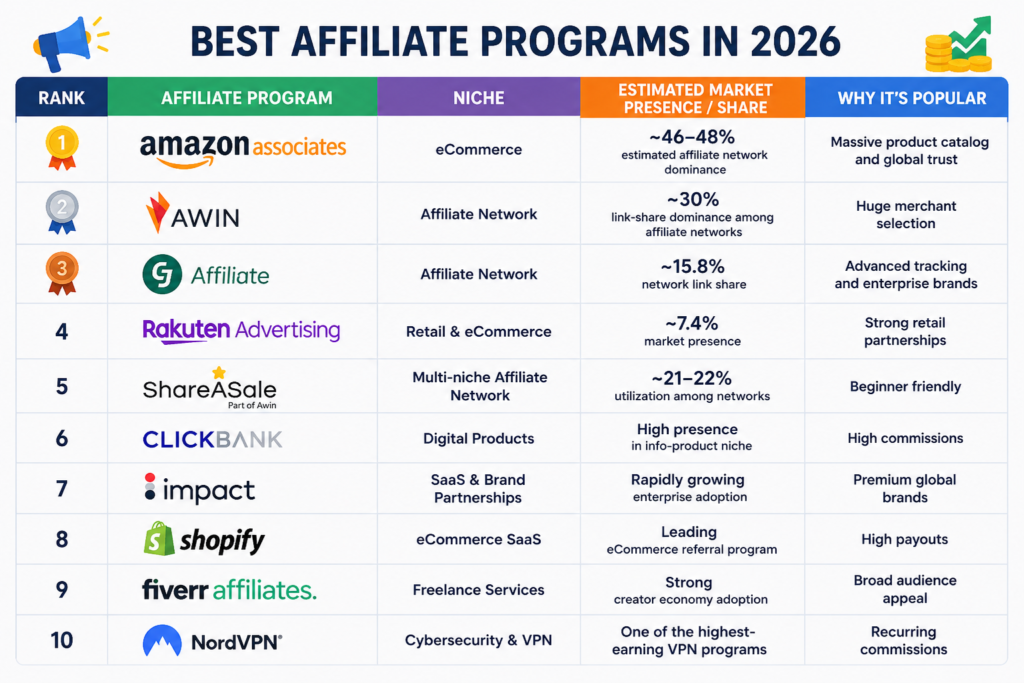
    Affiliate marketing has become one of the most reliable ways to generate passive income online. If your website, blog, YouTube channel, or social media page already has quality traffic, affiliate programs can turn that audience into recurring revenue without creating your own products.

    Unlike traditional online businesses, affiliate marketing doesn’t require inventory, shipping, customer support, or product development. You simply recommend products or services and earn a commission when users make a purchase through your referral link.

    Today, thousands of creators, bloggers, and niche website owners use affiliate marketing as their primary monetization strategy because it scales easily and works in almost every industry — from technology and finance to beauty, education, SaaS, and eCommerce.

    Why Affiliate Programs Are So Popular

    1. Low Startup Cost

    You can start affiliate marketing with just a website, blog, or social media account. Most affiliate programs are free to join, making it one of the cheapest online business models.

    2. Passive Income Potential

    Once your content ranks on Google or gains traction on social media, affiliate commissions can continue for months or even years.

    3. No Product Creation Needed

    You promote trusted brands and established products instead of building your own.

    4. Scales With Traffic

    The more targeted traffic your site receives, the higher your earning potential becomes.

    5. Works in Every Niche

    Affiliate marketing exists in nearly every industry including:

    • Web hosting
    • SaaS tools
    • VPN services
    • Fashion
    • Health & fitness
    • Finance
    • Online education
    • eCommerce

    According to industry reports, affiliate marketing continues to grow globally as brands increasingly rely on performance-based marketing strategies.


    Which Affiliate Niches Make the Most Money?

    Some affiliate niches consistently outperform others because they offer:

    • High customer demand
    • Recurring subscriptions
    • Large commission payouts

    High-Paying Affiliate Niches

    • SaaS software
    • VPN services
    • Web hosting
    • AI tools
    • Finance
    • Online education
    • Digital marketing tools

    Community discussions and affiliate benchmark studies show that SaaS and AI-related affiliate programs currently offer some of the highest recurring commissions online.
  • Weekly Progress Report: Building the Foundation


    It has been an incredibly productive week! To keep things transparent and show you exactly how I’m building this project from the ground up, I wanted to share a quick status update on my launch phase.

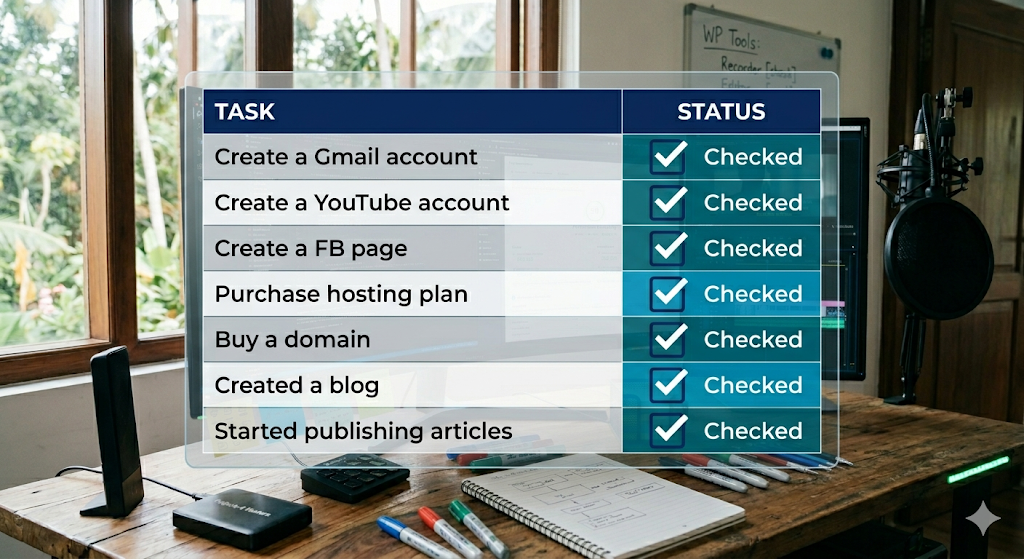
    Setting up a professional digital presence requires a solid infrastructure. Here is the progress I’ve made over the last seven days:

    • Digital Identity: Successfully created a dedicated Gmail account and YouTube channel to host future video content.
    • Social Reach: Launched my official Facebook page to connect with the community.
    • The Command Center: Finalized the purchase of a hosting plan and secured my domain name.
    • Content Launch: The blog is officially live, and I have already started publishing articles to share my journey with you.

    What’s Next?

    While the foundation is solid, the work is just beginning. My next focus areas are:

    • Evaluate Webmaster Tools: Testing the best software to streamline development.
    • Evaluate Affiliate Programs: Researching sustainable ways to generate online income.

    Stay tuned—the toolkit is expanding!

  • Step 4: Sharpen Your Tools

    The Webmaster’s Survival Kit

    You’ve secured a reliable hosting partner, claimed your free domain, and launched your WordPress blog to document the journey. The foundation is laid. Now what?

    In the world of web development, your efficiency is only as good as your stack. While you could code every solution from scratch, a smart developer knows when to build and when to leverage existing power. There’s no need to reinvent the wheel when you can ride the one that’s already polished.

    To transition from a beginner to a pro webmaster who actually earns online, you need a workflow that saves time and looks professional. Here is the essential checklist of tools you need to master right now.


    1. High-Performance Screen Recording

    Before you show the world your code, you need to capture it. A good screen recorder isn’t just about “recording”; it’s about clarity, frame rates, and ease of use. Whether you are creating tutorials or documenting bugs, your output needs to be crisp.

    • The Goal: Lightweight software that doesn’t lag your IDE while recording.
    • Pro Tip: Look for tools that allow for “Selected Area” recording so your cluttered desktop stays private.

    In Ubuntu OS , it has inbuilt screen recorder . I use that since I use Ubuntu .

    ***I’ll be adding more tools for Windows and Mac after my research

    2. Video Editing, Subtitles & AI Voice

    Content is king, but accessible content is the emperor. If you’re building a brand, your videos need to reach everyone—including those watching on mute or in different languages.

    • Subtitle Automation: Don’t type out every word. Use tools that use speech-to-text to hardcode captions in seconds.
    • AI Voice Dubbing: Not everyone is comfortable on a mic. High-quality AI voiceovers can turn a silent screen recording into a professional masterclass.
    • The Edge: Use editors that offer “Timeline Templates” to keep your branding consistent across every post.

    ***I’ll be adding examples with reviews after my research

    3. Site Optimization Tools

    A beautiful site that loads slowly is a failed site. As a webmaster, your job is to keep the “vitals” healthy. You need services that analyze your performance and tell you exactly where the bottlenecks are.

    • Image Compression: Automatically shrink your assets without losing quality.
    • Caching & CDNs: Ensure your blog loads instantly, whether your reader is in New York or Tokyo.
    • SEO Auditors: Tools that scan your WordPress posts to ensure you’re actually ranking on Google.

    The Road Ahead

    I’ve already scouted the field and found a top-tier screen recorder—check out my previous post for the full breakdown.

    Over the next few days, I’ll be dropping the definitive list of services every webmaster needs to turn their code into a consistent online income.

    Standby and keep your tools sharp. The grind is about to get a lot more efficient.

  • Step 1 : Select your hosting partner

    The Ultimate Guide to Choosing Your Web Hosting Partner: Why I Picked Hostinger

    Starting a blog or a website is an exhilarating journey, but before you hit “Publish” on that first post, you face one of the most critical decisions of your digital life: Choosing a Web Hosting Partner.

    Your host is the foundation of your site. If the foundation is shaky, the whole house—no matter how beautiful—will eventually crumble. After extensive research and weighing the heavyweights of the industry, I’ve officially launched this blog.

    Here is what you need to consider when choosing your partner, and why I ultimately settled on Hostinger.


    What to Look for in a Web Hosting Partner

    When you’re scanning the market, it’s easy to get distracted by flashy discounts. However, to build a sustainable blog, you need to focus on these six pillars:

    1. Reliability & Uptime: If your site is down, you’re losing readers and revenue. Look for a “Three Nines” guarantee (99.9% uptime).
    2. Speed & Performance: In the world of SEO, speed is a ranking factor. Your host should use modern technology (like LiteSpeed servers) to ensure your pages load instantly.
    3. Cost vs. Value: Don’t just look for the “cheapest.” Look for what you get for that price. Does it include backups? SSL? Email?
    4. Security: Cyber threats are real. Your host must provide a free SSL certificate, DDoS protection, and automated backups.
    5. Features: Look for a user-friendly control panel, one-click WordPress installation, and enough storage for your media.
    6. Market Share: A large market share often indicates a stable company with a proven track record and a community of users who trust them.

    My Research Journey: Why Hostinger?

    After comparing several providers, I found that Hostinger hit the “sweet spot” for both beginners and scaling professionals. They are currently one of the fastest-growing hosting companies in the world, and for good reason.

    1. Incredible Value for Money

    The entry price point is hard to beat, especially considering the premium hardware they use. It feels like getting a luxury service on a friendly budget.

    2. The “Freebie” That Sealed the Deal

    One of the biggest perks of selecting my hosting plan was the Free Domain Name. For a new blogger, this is a huge win. It keeps your initial investment low and simplifies the setup process—everything is managed in one dashboard.

    3. Optimized for WordPress

    Since this blog runs on WordPress, I needed a host that understands the platform. Hostinger’s managed WordPress features make technical maintenance a breeze, allowing me to focus on writing rather than server configurations.


    Setting Up This Blog

    I am officially using my free domain provided by Hostinger to host this very site. The setup was seamless:

    • Step 1: Picked a hosting plan.
    • Step 2: Claimed my free domain name.
    • Step 3: Used the Auto-Installer to launch WordPress.
    • Step 4: Secured the site with a free SSL.

    The performance so far has been snappy, and the interface is incredibly intuitive.


    Final Thoughts

    Choosing a host shouldn’t be a headache. If you prioritize uptime, security, and support, you’ll find a partner that grows with you. For me, Hostinger was the clear winner to kickstart this journey.

    Are you ready to start your blog? What’s the number one feature you look for in a host? Let me know in the comments!


    Tags: #WebHosting #HostingerReview #BloggingTips #WordPress #SEO #DigitalMarketing #TechGuide #WebDevelopment

  • My Journey Back to $1,000/Month

    Proof Over Promises: How I’m Documenting My Journey Back to $1,000/Month

    I’ve always believed that in digital marketing, results speak louder than words.

    When I was earning $1,000+ every month through AdSense and affiliate marketing, my biggest asset wasn’t just my strategy—it was the automated systems I built to keep the revenue flowing. Now that I’m returning to the field, I don’t want to just tell you what works; I want to show you.

    To make this journey easy for my followers to replicate, I’ve decided to record my screen as I build. No gatekeeping, no “magic” secrets—just real steps you can watch and follow.

    The Tool of Choice: Ubuntu’s Hidden Gem

    Since my workstation runs on Ubuntu, I went looking for a reliable screen recorder. To my surprise, I found that I didn’t even need to install third-party software. Ubuntu has a powerful, lightweight recorder built right into the system.

    If you are on Linux and want to document your own progress, here is how to use it:

    How to use: Simply press PrintScreen on your keyboard and click the camera icon to switch from “Photo” to “Video” mode.

    Features: You can choose to capture your entire desktop or just a specific region.

    Storage: Your recordings are automatically saved as WebM or MP4 files in your Videos/Screencasts folder.

    I just finished testing my first recording, and the quality is crystal clear. It’s ready to go.

    Coming Next: 1,000+ Ways to Earn Online

    In my next post, I am going to share a massive list of 1,000+ money-earning methods available on the internet today.

    Here is the best part:

    No Programming Required: You don’t need to be a coder to build these revenue streams.

    Zero Initial Investment: You don’t need to spend money to start making money.

    I’m going to break down how to use the same SEM and SEO logic that fueled my $1,200+ checks back in 2006, updated for the modern era.

    What are you using?

    I’ve got my Ubuntu setup ready to record, but I know many of you are on different systems.

    If you use Windows or Mac OS, what is your favorite screen recorder? Drop a comment below with your recommendations—let’s help everyone in this community get the tools they need to start documenting their own path to $1,000/month!

Privacy Policy || Terms of Service || Contact Us || About Us