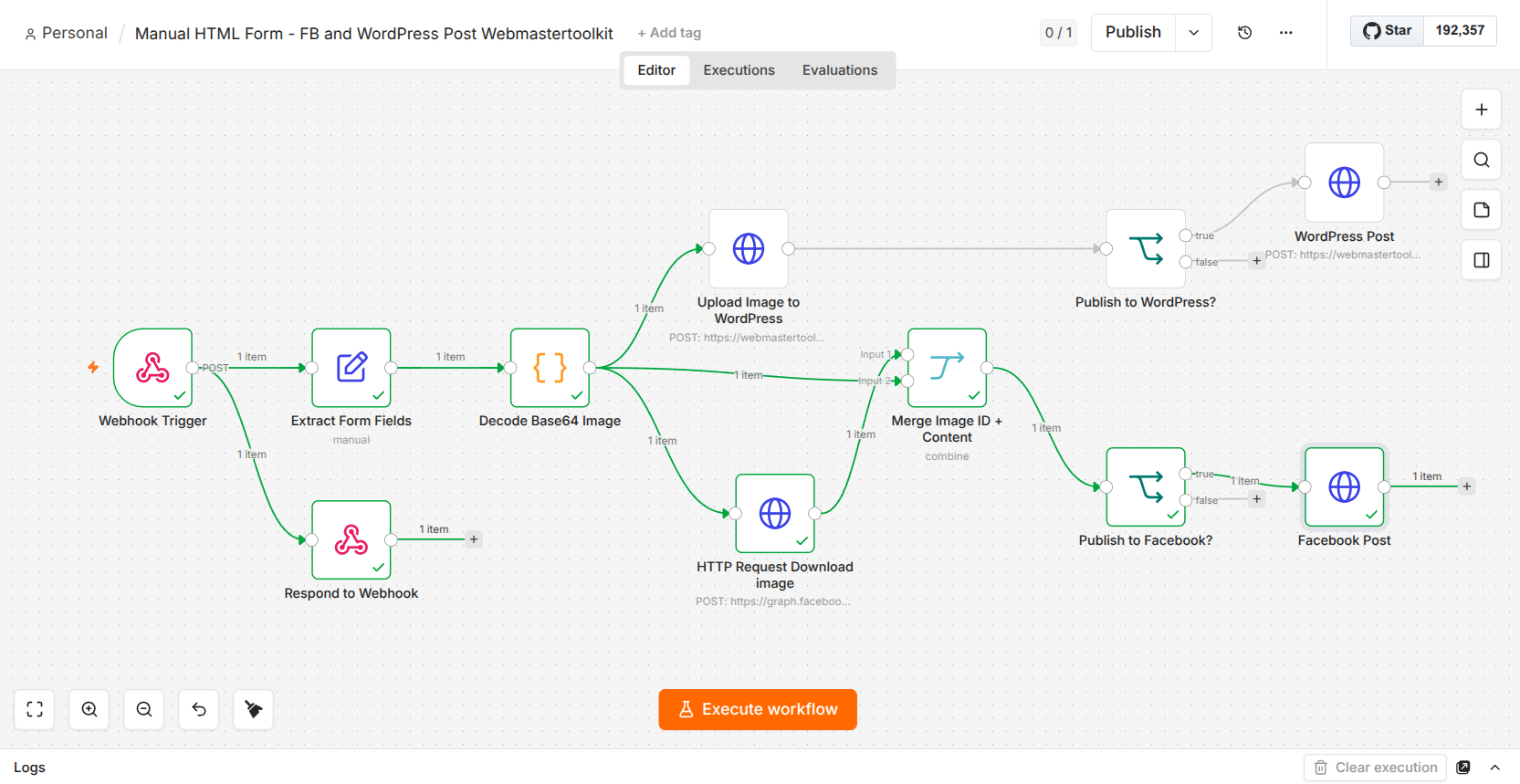
Logging into Facebook. Posting. Logging into WordPress. Posting again. 🔄
If you’re a webmaster managing multiple platforms, you know exactly how painful and time-consuming this routine is.
I finally got tired of the repetition, so I built a central automation flow! Now, I upload my content once, and it automatically posts to both Facebook and WordPress.
Planning to loop in Pinterest next! 📌
What’s your favorite automation hack? 🤖
The 5 Best Free AI Video Generators in 2026 (Create Cinematic Videos For Zero Dollars)
The AI video landscape is moving at a breakneck pace. What used to require a massive Hollywood budget or a high-end editing suite can now be done directly from your web browser in a matter of seconds.
Whether you are a content creator looking to dominate TikTok and Reels, a marketer building eye-catching ads, or a hobbyist experimenting with AI filmmaking, you don’t need a premium subscription to start creating.
While many platforms are locking their best features behind steep paywalls, several industry leaders still offer incredible free tiers. Here are the best free AI video tools available right now in 2026 and how to get the most out of them.
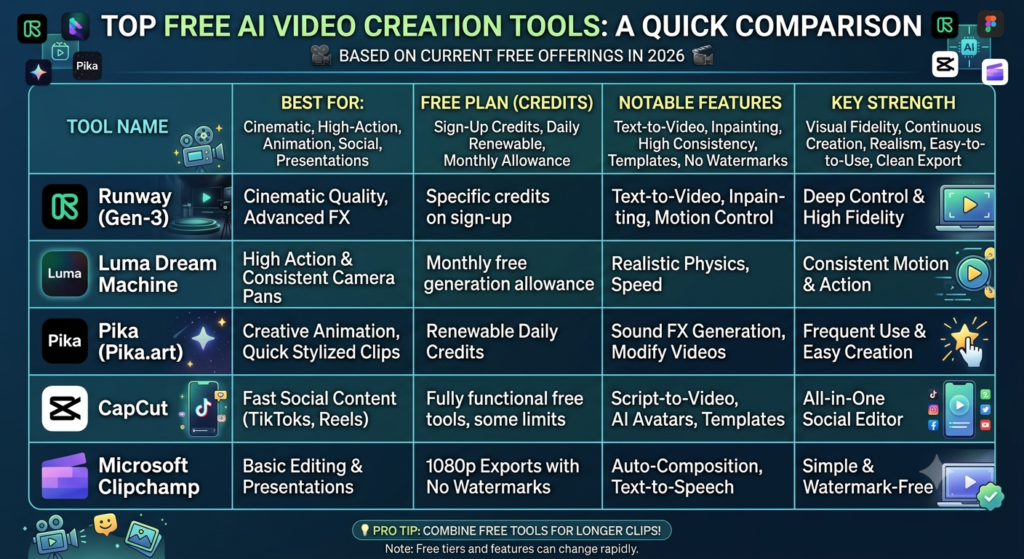
The Top Free AI Video Creators Ranked
1. Runway (Gen-3 Alpha) – Best for Cinematic Quality
Runway has long been a pioneer in the generative AI space, and their latest models continue to push boundaries. If you want hyper-realistic footage that looks like it belongs on a movie screen, this is your starting point.
Best For: Mind-blowing cinematic quality, realistic text-to-video, and precise image-to-video generation.
The Free Deal: Runway offers a set amount of free trial credits upon sign-up, allowing you to test out Hollywood-level visual fidelity without touching your wallet.
Why It Stands Out: Its understanding of complex lighting, physics, and textures is top-tier.
2. Luma Dream Machine – Best for Realistic Action & Camera Motion
Luma Labs shocked the tech world with the release of Dream Machine, an AI model built to generate high-quality, realistic videos from text and images with incredible speed.
Best For: High-action shots, smooth cinematic camera pans, and flawless 3D consistency.
The Free Deal: Unlike tools that limit you to a one-time trial, Luma offers a highly generous, recurring monthly allowance of free generations.
Why It Stands Out: It excels at maintaining character consistency and realistic physics, even during fast camera movements.
3. Pika (Pika.art) – Best for Animation and Sound Effects
If you want to create something highly stylized, animated, or just plain fun, Pika is a powerhouse. It is one of the most user-friendly and feature-rich platforms for everyday creators.
Best For: Creative animations, quick stylized clips, and generating built-in AI sound effects.
The Free Deal: Pika operates on a renewable daily credit system, meaning your account refreshes with free generation power every single day.
Why It Stands Out: Features like “Inpainting” (modifying just a specific part of a video) and automatic sound effects generation make it a complete creative sandbox.
4. CapCut – Best for Social Media Creators
Not every AI video tool needs to build a scene from scratch. If you already make content for TikTok, Instagram Reels, or YouTube Shorts, CapCut’s suite of automated AI features will save you hours of work.
Best For: Script-to-video generation, AI avatars, automated templates, and viral-style auto-captions.
The Free Deal: CapCut offers a massive, highly functional free tier across its web, desktop, and mobile applications.
Why It Stands Out: It bridges the gap between AI generation and traditional editing. You can type out a script, let the AI generate a rough cut with voiceovers, and edit it instantly.
5. Microsoft Clipchamp – Best for Watermark-Free Editing
If you are tired of great free tools ruining your final product with a massive, ugly watermark in the corner, Microsoft Clipchamp is the answer.
Best For: Clean corporate presentations, standard video editing, and flawless text-to-speech.
The Free Deal: Clipchamp allows you to export unlimited videos at 1080p resolution with zero watermarks on the free tier.
Why It Stands Out: It features brilliant built-in AI “auto-composition” tools that can automatically stitch your raw footage into a cohesive video based on your chosen theme.
💡 Pro-Tip: How to Bypass the “4-Second Limit” For Free
If you’ve experimented with free AI video tools, you’ve probably noticed a catch: most free tiers limit your video generations to just 4 seconds per clip.
To bypass this barrier and create longer, high-quality videos completely for free, use the Image-to-Video Workflow:
Generate a static image first: Use a high-quality, free AI image generator (like Bing Image Creator, Canva, or Midjourney) to create the exact visual framing you want.
Animate it: Upload that high-resolution image into Luma Dream Machine or Pika.
Extend: Use the platform’s free “Extend Video” tool to add another 4 seconds to the clip, smoothly continuing the motion.
By using a static image as your baseline, you give the video AI a perfectly clear starting point, resulting in much higher quality than prompting text alone!
Which AI Video Tool Will You Try First?
The barrier to entry for video creation has officially vanished. If you want Hollywood realism, try Luma or Runway. If you want everyday social media content or quick animations, CapCut and Pika have you covered.
Over to you: Are you planning to use AI for social media, marketing, or filmmaking? Let us know your favorite tool in the comments below!
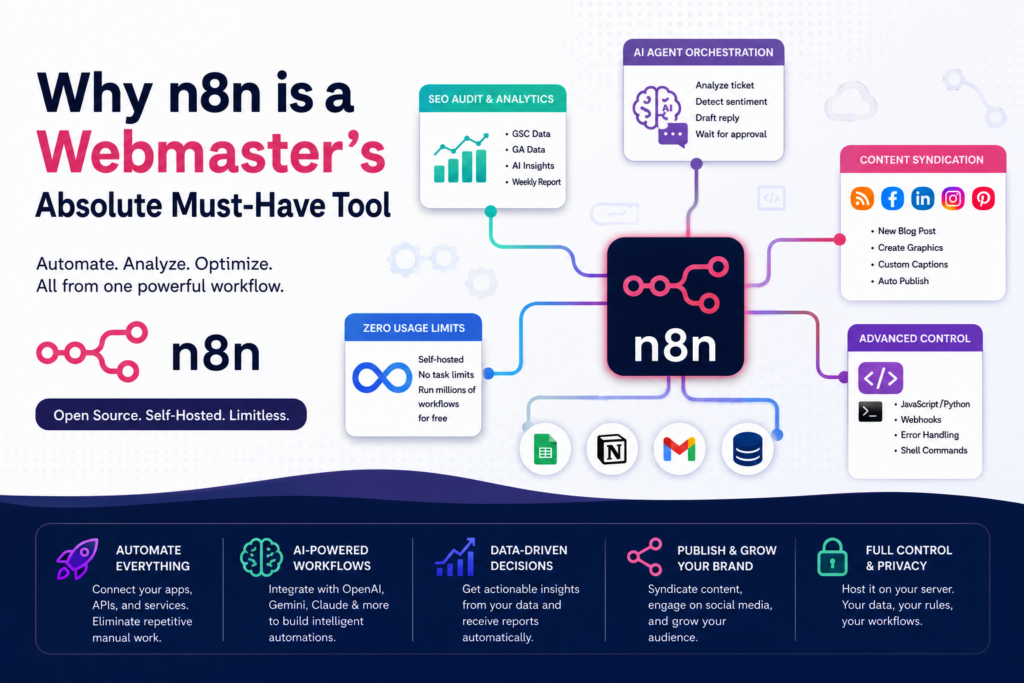
If you manage one blog or direct an entire portfolio of e-commerce websites, n8n handles the heavy backend lifting. It belongs in your toolkit for several key reasons:
1. Zero Usage Limits via Self-Hosting
Commercial automation platforms charge you based on the number of “tasks” or “operations” you execute each month. If you run a high-traffic site, syncing thousands of form submissions or data points can cost hundreds of dollars monthly.
Because n8n can be self-hosted, you face zero task limits. You can run millions of complex workflows completely free, limited only by the processing power of your server.
2. Native AI Agent Orchestration
Automation isn’t just about moving data from Point A to Point B anymore. n8n features built-in, dedicated AI nodes that seamlessly connect directly to major Large Language Models like Google Gemini, OpenAI, and Anthropic Claude.
As a webmaster, you can build intelligent workflows that don’t just copy text, but actually analyze it. For example, your workflow can automatically read an incoming support ticket, classify its emotional sentiment, draft an appropriate response, and wait for your manual approval before emailing the customer.
3. Automated SEO Auditing & Analytics Monitoring
Instead of manually opening Google Search Console and Google Analytics every morning, you can instruct n8n to do the data wrangling for you.
You can design a weekly workflow that pulls your XML sitemap, fetches the organic click-through rate (CTR) and bounce rate for every live URL, feeds that data into an AI node to pinpoint underperforming pages, and automatically emails you a neatly organized HTML table of priority SEO optimization tips.
4. Flawless Content Syndication & Social Media Batching
Keeping your brand active across Facebook, Instagram, LinkedIn, and Pinterest is exhausting. With n8n, you can turn your website’s RSS feed or a simple content calendar (like Google Sheets or Notion) into an automated publishing powerhouse. When a new blog post goes live, n8n can automatically generate custom promotional graphics, rewrite appropriate social captions tailored to each platform, and publish them instantly.
5. Advanced Technical Control (Drop into Code Anytime)
While n8n is incredibly beginner-friendly, it doesn’t trap you in a “no-code” box. If a pre-built node doesn’t do exactly what you want, you can easily drop a custom JavaScript or Python code snippet right into the middle of your workflow. It also features robust error-handling pipelines, custom webhook listeners, and the ability to run server shell commands—giving you total control over your server environment.
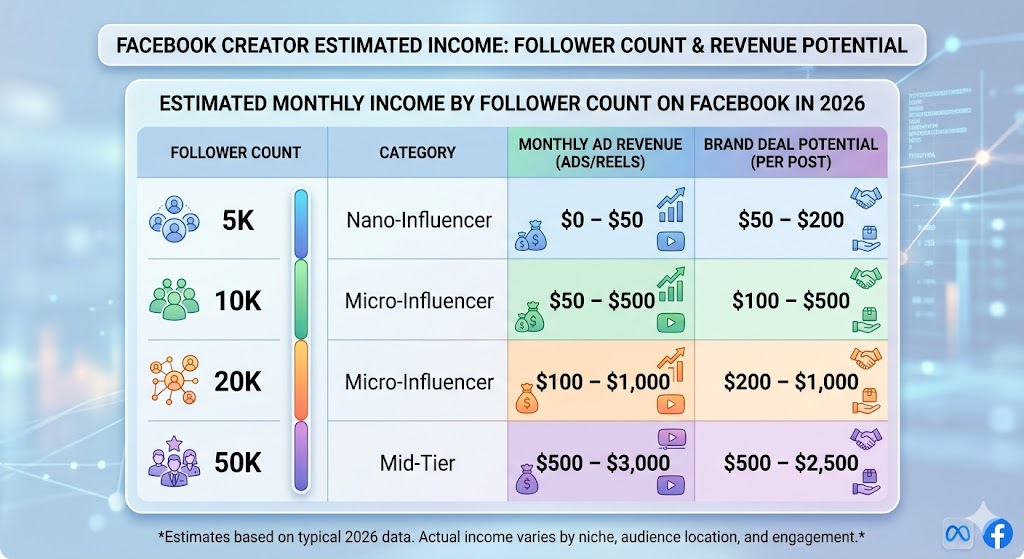
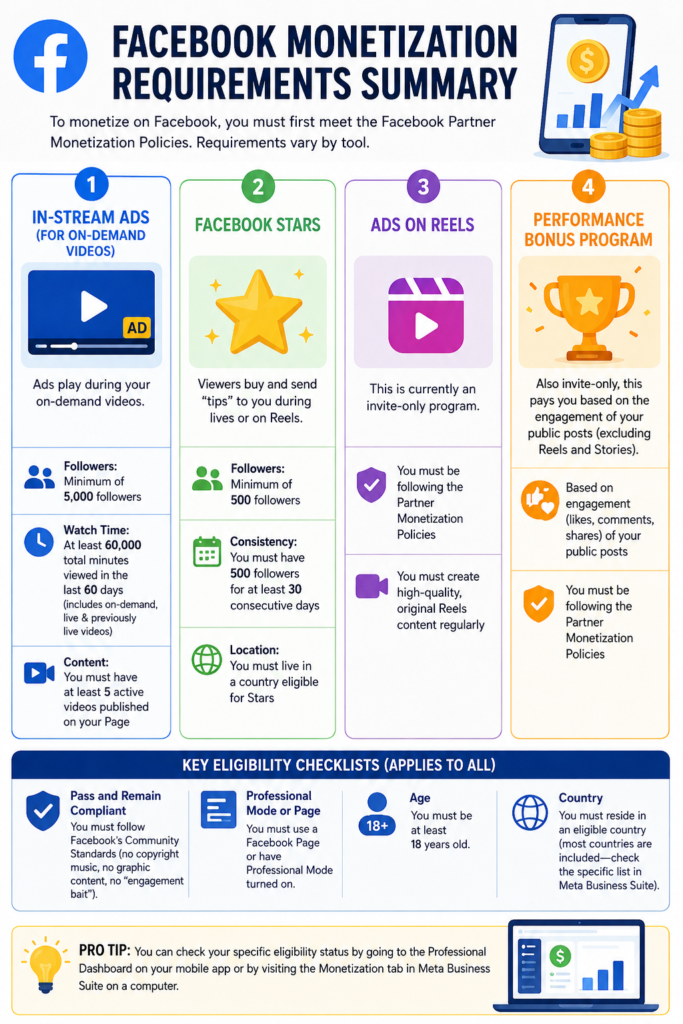
To monetize on Facebook (FB), the requirements vary depending on which specific tool you want to use (such as In-Stream Ads, Stars, or Subscriptions). However, all accounts must first meet the Facebook Partner Monetization Policies.
Here are the minimum requirements for the most popular monetization features:
1. In-Stream Ads (For On-Demand Videos)
This is the most common way to earn, where ads play during your videos.
Followers: Minimum of 5,000 followers. – You need to have 5000+ Followers
Watch Time: At least 60,000 total minutes viewed in the last 60 days (this includes on-demand, live, and previously live videos).
Content: You must have at least 5 active videos published on your Page.
There are Few more options. I will discuss lator.
What you need to do is , you need to post useful articles , pictures and videos regularly
Static content alone doesn’t stop the scroll anymore. If you want to grow on platforms like YouTube or TikTok, high-quality video content has become essential for building attention, engagement, and brand trust.
That’s why the next big step for creators and businesses alike is choosing the right video editing software.
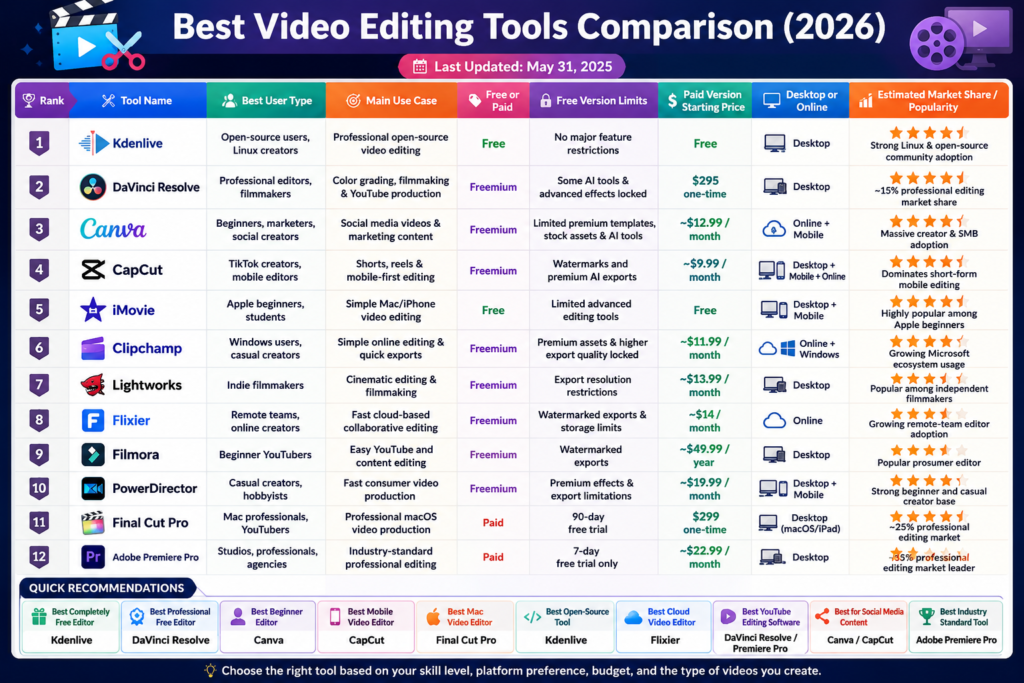
After exploring the top editing tools for 2026, one thing became clear:
The best editing software isn’t the one with the most features — it’s the one that fits your workflow.
🎯 4 Things to Consider Before Choosing a Video Editor
1. Your Skill Level
Are you looking for something beginner-friendly that does most of the heavy lifting for you?
Tools like CapCut and iMovie are perfect for fast, simple editing.
Or do you want professional-level control and cinematic quality?
Then tools like DaVinci Resolve may be the better fit.
2. Your Budget & Goals
Ask yourself:
Are you experimenting and learning for free?
Or are you building a serious content business?
Free tools are excellent for getting started, while platforms like Adobe Premiere Pro offer advanced commercial features for creators ready to scale.
Think of your editing software as an investment in your content quality and efficiency.
3. Features That Actually Matter
Modern video creation is moving fast.
Look for tools that include:
AI text-to-video – Very useful feature
Auto-captions – Very useful feature
Smart reframing for social media
One-click templates
Background removal
Audio enhancement
These features can save hours of editing time.
4. Performance & Speed
Even the best software becomes frustrating if it lags constantly.
A slow timeline is one of the biggest productivity killers in content creation.
Before committing, make sure the software runs smoothly on your computer or mobile device.
🚀 Quick-Start Video Editing Tools to Watch in 2026
For Fast Social Media Content
CapCut & InShot
Perfect for:
TikTok videos
Reels
Shorts
Trending templates
Quick mobile editing
Fast, simple, and built for modern social content.
For Branded Marketing Content
Canva Video & Adobe Express
Ideal if you already create graphics, presentations, or social posts.
These tools make it easy to keep your branding consistent across both visuals and video.
For the Professional Cinematic Look (Free)
DaVinci Resolve
Hollywood-level editing without the expensive subscription.
Powerful color grading, advanced effects, and professional editing tools — all available in a surprisingly capable free version.
Most probably I will go for Canva or Capcut . But I will let you know once I finalize it .