Static content alone doesn’t stop the scroll anymore.
If you want to grow on platforms like YouTube or TikTok, high-quality video content has become essential for building attention, engagement, and brand trust.
That’s why the next big step for creators and businesses alike is choosing the right video editing software.
After exploring the top editing tools for 2026, one thing became clear:
The best editing software isn’t the one with the most features — it’s the one that fits your workflow.
🎯 4 Things to Consider Before Choosing a Video Editor
1. Your Skill Level
Are you looking for something beginner-friendly that does most of the heavy lifting for you?
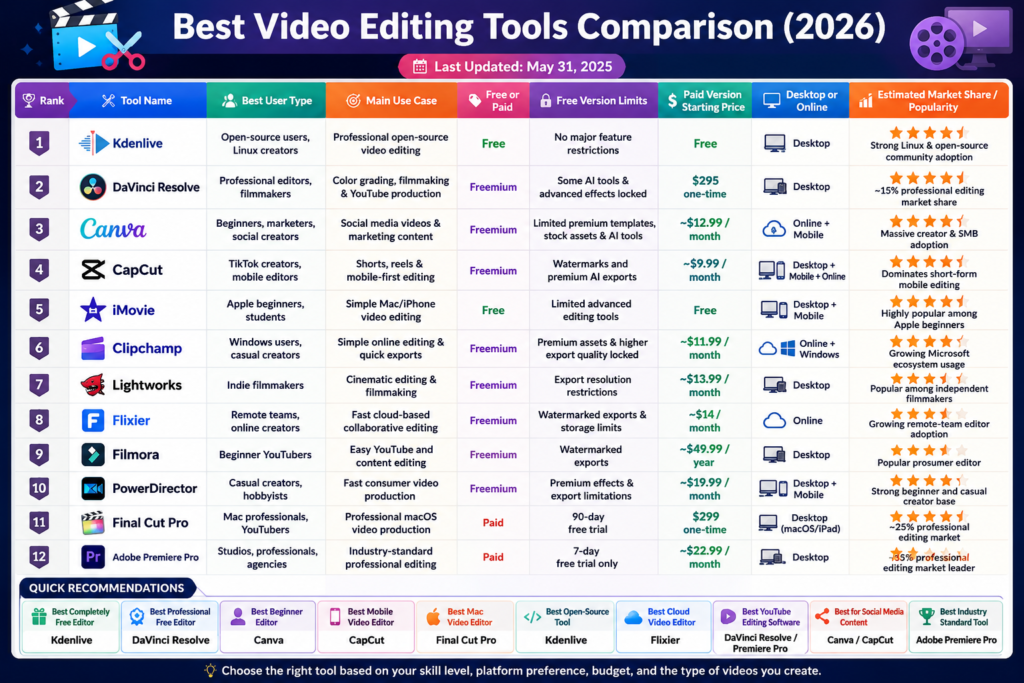
Tools like CapCut and iMovie are perfect for fast, simple editing.
Or do you want professional-level control and cinematic quality?
Then tools like DaVinci Resolve may be the better fit.
2. Your Budget & Goals
Ask yourself:
- Are you experimenting and learning for free?
- Or are you building a serious content business?
Free tools are excellent for getting started, while platforms like Adobe Premiere Pro offer advanced commercial features for creators ready to scale.
Think of your editing software as an investment in your content quality and efficiency.
3. Features That Actually Matter
Modern video creation is moving fast.
Look for tools that include:
- AI text-to-video – Very useful feature
- Auto-captions – Very useful feature
- Smart reframing for social media
- One-click templates
- Background removal
- Audio enhancement
These features can save hours of editing time.
4. Performance & Speed
Even the best software becomes frustrating if it lags constantly.
A slow timeline is one of the biggest productivity killers in content creation.
Before committing, make sure the software runs smoothly on your computer or mobile device.
🚀 Quick-Start Video Editing Tools to Watch in 2026
For Fast Social Media Content
CapCut & InShot
Perfect for:
- TikTok videos
- Reels
- Shorts
- Trending templates
- Quick mobile editing
Fast, simple, and built for modern social content.
For Branded Marketing Content
Canva Video & Adobe Express
Ideal if you already create graphics, presentations, or social posts.
These tools make it easy to keep your branding consistent across both visuals and video.
For the Professional Cinematic Look (Free)
DaVinci Resolve
Hollywood-level editing without the expensive subscription.
Powerful color grading, advanced effects, and professional editing tools — all available in a surprisingly capable free version.
Most probably I will go for Canva or Capcut . But I will let you know once I finalize it .
Leave a Reply