The 5 Best Free AI Video Generators in 2026 (Create Cinematic Videos For Zero Dollars)
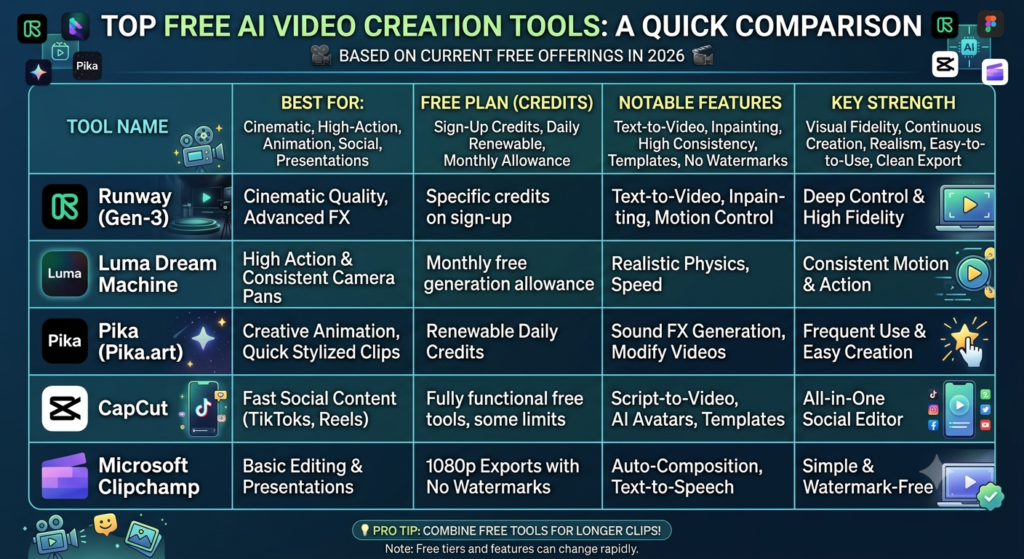
The AI video landscape is moving at a breakneck pace. What used to require a massive Hollywood budget or a high-end editing suite can now be done directly from your web browser in a matter of seconds.
Whether you are a content creator looking to dominate TikTok and Reels, a marketer building eye-catching ads, or a hobbyist experimenting with AI filmmaking, you don’t need a premium subscription to start creating.
While many platforms are locking their best features behind steep paywalls, several industry leaders still offer incredible free tiers. Here are the best free AI video tools available right now in 2026 and how to get the most out of them.
The Top Free AI Video Creators Ranked
1. Runway (Gen-3 Alpha) – Best for Cinematic Quality
Runway has long been a pioneer in the generative AI space, and their latest models continue to push boundaries. If you want hyper-realistic footage that looks like it belongs on a movie screen, this is your starting point.
- Best For: Mind-blowing cinematic quality, realistic text-to-video, and precise image-to-video generation.
- The Free Deal: Runway offers a set amount of free trial credits upon sign-up, allowing you to test out Hollywood-level visual fidelity without touching your wallet.
- Why It Stands Out: Its understanding of complex lighting, physics, and textures is top-tier.
2. Luma Dream Machine – Best for Realistic Action & Camera Motion
Luma Labs shocked the tech world with the release of Dream Machine, an AI model built to generate high-quality, realistic videos from text and images with incredible speed.
- Best For: High-action shots, smooth cinematic camera pans, and flawless 3D consistency.
- The Free Deal: Unlike tools that limit you to a one-time trial, Luma offers a highly generous, recurring monthly allowance of free generations.
- Why It Stands Out: It excels at maintaining character consistency and realistic physics, even during fast camera movements.
3. Pika (Pika.art) – Best for Animation and Sound Effects
If you want to create something highly stylized, animated, or just plain fun, Pika is a powerhouse. It is one of the most user-friendly and feature-rich platforms for everyday creators.
- Best For: Creative animations, quick stylized clips, and generating built-in AI sound effects.
- The Free Deal: Pika operates on a renewable daily credit system, meaning your account refreshes with free generation power every single day.
- Why It Stands Out: Features like “Inpainting” (modifying just a specific part of a video) and automatic sound effects generation make it a complete creative sandbox.
4. CapCut – Best for Social Media Creators
Not every AI video tool needs to build a scene from scratch. If you already make content for TikTok, Instagram Reels, or YouTube Shorts, CapCut’s suite of automated AI features will save you hours of work.
- Best For: Script-to-video generation, AI avatars, automated templates, and viral-style auto-captions.
- The Free Deal: CapCut offers a massive, highly functional free tier across its web, desktop, and mobile applications.
- Why It Stands Out: It bridges the gap between AI generation and traditional editing. You can type out a script, let the AI generate a rough cut with voiceovers, and edit it instantly.
5. Microsoft Clipchamp – Best for Watermark-Free Editing
If you are tired of great free tools ruining your final product with a massive, ugly watermark in the corner, Microsoft Clipchamp is the answer.
- Best For: Clean corporate presentations, standard video editing, and flawless text-to-speech.
- The Free Deal: Clipchamp allows you to export unlimited videos at 1080p resolution with zero watermarks on the free tier.
- Why It Stands Out: It features brilliant built-in AI “auto-composition” tools that can automatically stitch your raw footage into a cohesive video based on your chosen theme.
💡 Pro-Tip: How to Bypass the “4-Second Limit” For Free
If you’ve experimented with free AI video tools, you’ve probably noticed a catch: most free tiers limit your video generations to just 4 seconds per clip.
To bypass this barrier and create longer, high-quality videos completely for free, use the Image-to-Video Workflow:
- Generate a static image first: Use a high-quality, free AI image generator (like Bing Image Creator, Canva, or Midjourney) to create the exact visual framing you want.
- Animate it: Upload that high-resolution image into Luma Dream Machine or Pika.
- Extend: Use the platform’s free “Extend Video” tool to add another 4 seconds to the clip, smoothly continuing the motion.
By using a static image as your baseline, you give the video AI a perfectly clear starting point, resulting in much higher quality than prompting text alone!
Which AI Video Tool Will You Try First?
The barrier to entry for video creation has officially vanished. If you want Hollywood realism, try Luma or Runway. If you want everyday social media content or quick animations, CapCut and Pika have you covered.
Over to you: Are you planning to use AI for social media, marketing, or filmmaking? Let us know your favorite tool in the comments below!